


Open Headunit
4.135.00 Reviews
App Specs
- Version
- 3.2.5
- Updated On
- License
- $3.99
- Downloads
- 10,000+
- Developer
- André Rinas
- Categories
- Maps & Navigation
- Platform
- Android
Screenshots
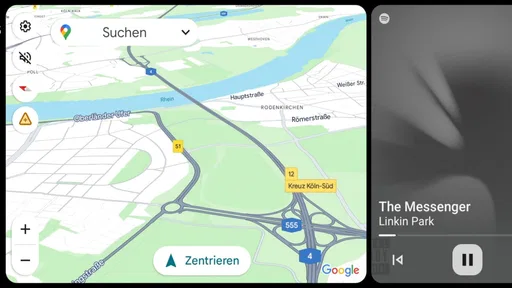
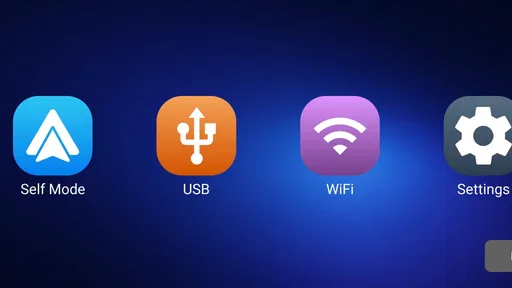
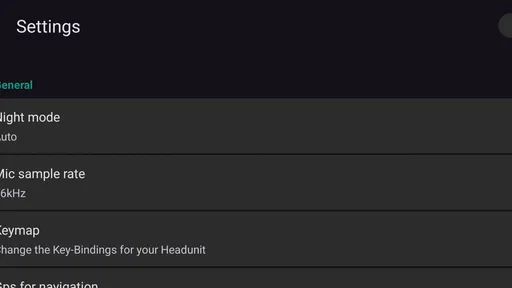
 Analysis by AppCompare
Turning an Android tablet into a car display sounds simple until the first real journey exposes the awkward parts: small controls, distracting setup steps, poor visibility, or a connection that behaves differently from the phone you normally use. Open Headunit approaches the problem from a clear angle. It is an Android navigation app made by André Rinas that lets a compatible tablet act as an Android Auto headunit through USB or wireless connection. I found its appeal less in decoration and more in the possibility of reusing a larger screen for maps, calls, music, and other driving tasks.
That larger display can make a meaningful difference for some drivers. A tablet mounted in a sensible position may be easier to read than a phone, especially when route instructions, road names, and next turns feel cramped on a smaller screen. At the same time, the app is not a magic conversion that removes every difficulty. The quality of the experience depends heavily on the tablet, the mounting position, the phone, the vehicle environment, and how comfortable you are with troubleshooting Android connections.
How Open Headunit feels when the screen becomes the headunit
I focus here on the practical change that matters most: using a tablet as the screen for Android Auto, rather than treating it as just another map app. In my experience, the larger display is only a real improvement when its position, connection routine, and everyday handling all work together. That makes the setup itself the next thing worth examining.
Readability and navigation on a larger Android display
My first impression is that the app makes most sense for someone who already has a spare Android tablet and wants to give it a focused role in the car. Instead of holding a phone close to the steering wheel or glancing down at a dashboard-mounted handset, you can place the tablet where the route is more visible. That is the practical reason to consider Open Headunit, and it is stronger than the novelty of simply putting Android Auto on another screen.
A bigger display does not automatically mean better usability. If the tablet is mounted too far away, angled toward sunlight, or positioned where the dashboard creates reflections, extra screen area can become wasted area. I would test the viewing angle while seated normally, not while holding the device in my hand. The most useful position is one that lets me recognize the next instruction with a brief glance, without encouraging me to study the map while moving.
The navigation experience also benefits from keeping the tablet dedicated to the driving interface. A spare device can be less tempting than a personal phone filled with messages, photographs, and unrelated apps. In that sense, the app can simplify the visual environment: I can leave the tablet mounted, connect the phone, and treat the larger screen as a purpose-built extension rather than another general Android device.
For people with reduced visual acuity, a larger map and more comfortably spaced interface can be helpful, but I would not describe that as a guaranteed accessibility solution. The tablet’s own display quality, text rendering, brightness, and Android settings still matter. I would adjust system font and display options before the first trip, then check whether those changes affect the layout or make important controls harder to reach.
Worth Reading Before You Choose

Flipboard Shows What News Apps Must Do Beyond the Feed

Switching to Android Auto Means Rethinking Your Driving Routine

Google Calendar Makes a Crowded Week Easier to Manage

Ludo King Makes the Most of the Minutes Between Plans

Baby Panda World Brings Quick Play to Modern Phones, but Its Game Library Feels Busy

ESPN’s Live Game View Makes Following Close Games Easier
There is also a useful distinction between seeing information and processing it quickly. A large screen may make route guidance easier to identify, while a busy map can still demand too much attention. I prefer a restrained view with the route and next maneuver easy to pick out. If the screen encourages constant map exploration, it is working against safe use, regardless of its size.
USB and wireless connection choices
Open Headunit supports both USB and wireless use, which gives the app flexibility for different cars and different routines. Wired use is usually the sensible starting point because it reduces the number of variables during setup. It also avoids relying on a wireless link when I am trying to determine whether the tablet, phone, and app are communicating correctly.
Once the basic connection works, wireless operation can make everyday use cleaner. I do not have to route a cable across the dashboard each time, and the tablet can stay in its mount while the phone remains in a pocket or charging location. That convenience is valuable for short trips, but I would not assume wireless is automatically the best choice. A cable can be easier to diagnose, and a wireless arrangement may require more careful preparation before driving.
My practical advice is to create a repeatable pre-drive routine. Start the tablet, make sure it has enough battery, confirm the phone is ready, and connect before moving off. If a wireless connection is important to you, test it on several stationary journeys rather than judging it from a single successful pairing. The goal is not merely to make the app work once; it is to make the same sequence understandable when you are tired, late, or parked in an unfamiliar place.
That workflow is especially relevant for users who find multi-step technology tiring or confusing. A short written checklist placed somewhere safe in the car can reduce memory pressure. It might include powering the tablet, checking the mount, confirming the connection, and starting navigation before departure. This is not a feature of the app, but it is one of the best ways to turn a flexible setup into a dependable one.
Motor and sensory considerations in the car
Using a tablet as a headunit introduces physical decisions that do not exist when using a phone in the hand. The mount must hold the device securely, the cable must not interfere with steering or controls, and the screen must be reachable only when the vehicle is safely stopped. For someone with limited hand strength or reduced fine-motor control, repeated plugging, unplugging, or repositioning may become the most frustrating part of the experience.
I would therefore set up the tablet at home or while parked, rather than expecting to make adjustments at the roadside. A stable mount and a cable with enough slack can remove unnecessary reaching. If the device needs frequent physical intervention to reconnect, the arrangement is not yet accessible in practice, even if the software itself is straightforward.
Touch interaction deserves the same caution. A large tablet can provide more room between controls, but it can also place buttons farther apart and require a longer reach. Drivers who have tremors, limited reach, or difficulty making precise taps may find that voice control through the connected Android Auto experience is preferable whenever available. The safest workflow is one that minimizes touch interaction after the journey begins.
Sensory comfort is another real consideration. A bright tablet can be useful in daylight and unpleasant at night. Reflections, glare, animation, and changing contrast can make the display tiring, particularly for people sensitive to light or visual motion. I would test the device at different times of day and avoid treating maximum brightness as a permanent solution. The best level is the one that keeps instructions visible without turning the screen into a competing light source.
Sound matters too, although the final audio behavior depends on the connected setup rather than the app alone. Someone who is hard of hearing may prefer clear visual confirmation of route changes, while someone sensitive to sudden audio may want a calmer volume arrangement before leaving. I would verify where navigation prompts and media audio emerge, then make those adjustments while parked. The important point is to avoid discovering an uncomfortable sound profile during a complicated junction.
Situational access beyond the usual commute
The strongest use case I see is a shared or spare tablet that can be prepared for a particular driver. A family member who finds a phone screen too small may benefit from a familiar, larger display, while another person can still use the same car in a different way. The app makes the tablet more useful without requiring a dedicated automotive screen, though the physical setup still needs to be safe and stable.
It can also help when the phone must remain accessible for another reason. For example, I might keep the phone charging in a fixed place while using the tablet for the visible Android Auto interface. That separation can make the dashboard less cluttered and reduce the temptation to handle the phone. It does not remove the need for a compatible connection, but it creates a more deliberate division between the device supplying the connection and the screen I look at.
Another realistic scenario is a long trip in an older vehicle that lacks a built-in Android Auto display. A spare tablet can provide a larger navigation surface without replacing the entire car system. Before relying on it for a major journey, I would complete a local test route, including stopping and restarting the car, locking the phone, and dealing with a temporary disconnection. A successful setup in the driveway is not enough evidence for a several-hour trip.
The app may also suit people who prefer a consistent visual layout. If a vehicle’s built-in screen is too small, hard to see, or shared with controls they rarely use, a mounted tablet can offer a more predictable focal point. Still, predictability depends on leaving the arrangement unchanged. Moving the mount between drivers or cars can alter glare, reach, and viewing angle enough to undo the benefit.
For passengers, the larger screen may be more comfortable to inspect while planning a route or selecting content when the vehicle is stopped. That does not mean every passenger can safely reach it from every seat. A person with limited mobility may need the driver or another passenger to handle setup, so the arrangement should be designed around the person who will actually operate it, not only the person who owns the tablet.
What can make the experience difficult
Open Headunit is not the right choice for someone who expects a plug-and-play replacement for a factory headunit with no experimentation. It is a paid app costing $3.99, and the expense is only one part of the decision. You also need a suitable Android tablet, a sensible mount, and a phone and vehicle combination that cooperate with the Android Auto connection. If you do not already own the hardware, the total project can become much less attractive than using a conventional car display.
The app’s minimum operating-system requirement is Android 5.0, which makes it approachable for older tablets in principle. In practice, age brings its own trade-offs. An older device may have a dimmer screen, slower response, a tired battery, or a less convenient wireless setup. I would not choose a tablet solely because it meets the operating-system requirement; I would judge whether it remains pleasant and reliable in a hot, bright, moving car.
Connection troubleshooting is another barrier. When the display does not appear as expected, several parts of the chain may be responsible: the cable, phone settings, wireless state, tablet behavior, or the vehicle environment. That can be difficult for users who need simple, predictable technology. A wired test, a known-good cable, and a repeatable startup order can narrow the problem, but the process still asks for patience.
There is also a safety boundary that no app can solve. A tablet mounted in the wrong place can obstruct visibility, and a screen that is too visually demanding can increase distraction. I would never place it where it blocks the windscreen or important controls. I would also avoid changing settings, reconnecting devices, or searching through menus while driving. If the system fails, pulling over is part of using it responsibly.
People who need certified accessibility features, highly specialized input methods, or guaranteed compatibility with a particular assistive setup should be cautious. I would test the exact tablet, mount, phone, and vehicle combination before paying for a long-term arrangement. Open Headunit offers a route to a larger Android Auto screen, but it should not be treated as proof that every accessibility need will be met.
How it compares with familiar alternatives
The usual alternative is a phone mounted on the dashboard. That option is cheaper if the phone is already available and often simpler because fewer devices must communicate. It is a better fit for occasional navigation, minimal setup, or drivers who do not want another screen in the car. Open Headunit becomes more compelling when the phone’s display feels cramped or when a spare tablet can remain permanently prepared.
A factory Android Auto headunit is usually the cleaner long-term solution. It is integrated into the vehicle, tends to have a more suitable mounting position, and avoids carrying a tablet in and out. Replacing or upgrading that hardware can cost much more, however, and may not be practical for an older car. Open Headunit occupies the middle ground: more flexible than a phone alone, less integrated than a built-in system.
There are also dedicated aftermarket displays. These may be preferable for someone who wants a purpose-built installation rather than adapting a general Android tablet. Their advantage is a more predictable physical design; the tablet approach wins when reuse, experimentation, and screen size matter more than a factory-like finish. I would choose the app for flexibility, not because it removes the compromises of an improvised installation.
Who will appreciate it most
I think Open Headunit is best for an Android user with a spare tablet, a safe mounting plan, and a willingness to test connections before depending on them. It is particularly interesting for drivers who find a phone screen difficult to read, families sharing a car, and owners of vehicles without a convenient Android Auto display. The larger visual workspace can support a calmer, more legible driving routine when the hardware is chosen carefully.
I would skip it if I want a completely integrated solution, dislike troubleshooting, or do not have a tablet that remains comfortable in the car. I would also look elsewhere if my main requirement is a specialized accessibility system rather than a larger Android Auto screen. In those cases, a factory or dedicated aftermarket unit may offer fewer setup decisions and a better physical fit.
The app has a 4.1 average from over 290 ratings and more than 10 thousand installs, which suggests a real user base without making it a universal recommendation. Its current version is 3.2.5, and its Everyone age rating keeps the basic app classification broad. Those details are useful context, but they do not replace testing the complete setup that I would actually use on the road.
An inclusive verdict based on real-world use
My overall view is positive but practical. Open Headunit can give an Android tablet a valuable second life and make Android Auto easier to see than it is on a small phone. USB and wireless options let me choose between a more controlled setup and a cleaner daily routine. For the right combination of tablet, phone, car, and mount, that is a meaningful improvement rather than a gimmick.
Its inclusive value comes from flexibility: a larger screen may help some people read route information, a dedicated display may reduce phone handling, and a prepared setup can support different drivers with different comfort needs. But flexibility also shifts responsibility to the user. Mounting, brightness, touch demands, audio, connection reliability, and safe placement all need individual attention.
I would recommend it to a friend who already owns a suitable Android tablet and is comfortable spending time on a careful parked setup. I would first test the screen in daylight and darkness, practice the wired connection, then try wireless use without relying on it immediately. The best result comes from treating Open Headunit as part of a complete driving arrangement, not as a standalone fix for every visibility or access problem.
For that audience, the $3.99 purchase can be a sensible way to explore a larger Android Auto interface without committing to a new built-in system. For everyone else, the conventional phone mount or a dedicated headunit may be less demanding. I see Open Headunit as a useful, adaptable tool with genuine potential for clearer navigation, provided the user is willing to make the surrounding hardware and routine just as thoughtful as the software.
Pros
- Turns an Android device into a practical in-car infotainment display.
- Supports hands-free interaction for safer access while driving.
- Can provide navigation
- music
- and vehicle-focused features in one interface.
- Useful option for cars without built-in modern infotainment systems.
- May extend the life of an older phone or tablet used in the vehicle.
Cons
- Compatibility can vary depending on the car
- phone
- and head-unit hardware.
- Initial setup may require technical knowledge and several configuration steps.
- Performance depends heavily on the Android device used as the display.
- A stable connection is needed for reliable in-car operation.
- Some advanced features may require extra accessories or paid components.
FAQs for Open Headunit
What is Open Headunit and what does it do?
Open Headunit is an Android-based application designed to act as a customizable in-car infotainment interface. It can bring compatible phone features, navigation, media playback, and other driving-related tools into a head-unit-style dashboard. Its usefulness depends heavily on your vehicle, Android device, available hardware, and the connection method supported by your car stereo or display.
Is Open Headunit compatible with every car or Android device?
No. Open Headunit is not guaranteed to work with every vehicle, stereo system, or Android phone. Compatibility may depend on the Android version, screen resolution, USB or wireless connection support, audio configuration, and whether the car hardware accepts the required integration method. Before downloading, check the project documentation and test the app with your specific head unit to avoid connection or display problems.
Does Open Headunit require root access or additional hardware?
Requirements can vary according to how you plan to use Open Headunit. Some installations may work as a regular Android application, while advanced setups, external displays, dedicated head-unit hardware, or special vehicle connections may require additional configuration. Root access is not automatically needed in every case, but certain features or custom integrations could depend on permissions, adapters, or hardware that are not included with the app.
Can I use navigation, music, and other apps through Open Headunit?
Open Headunit is intended to provide a central interface for selected in-car functions, such as navigation and media control, but the exact experience depends on the applications installed on your device and the permissions they receive. Not every Android app is optimized for safe use while driving. It is best to configure destinations, playlists, and settings before starting your journey and use voice controls whenever possible.
Is Open Headunit safe and reliable for everyday driving?
The app can be useful for users who want a flexible, open, and customizable infotainment solution, but reliability may differ between devices and vehicle configurations. Connection drops, audio delays, screen scaling issues, or compatibility limitations can occur during setup. Drivers should never interact with the interface while moving, and they should verify that the installation does not block essential vehicle controls, warnings, or safety-related information.


